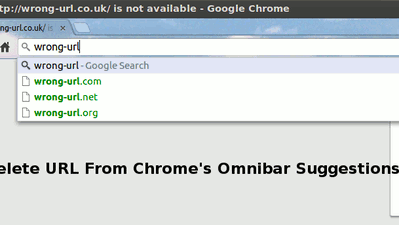
When you enter a URL in the Chrome Omnibar, that URL will be saved in the browser history and will show up when you type a similar query next time. This means that, if you have entered a wrong URL, that URL will be persistent and will always show up when you type a similar query. This can be rather annoying, and deleting the browser history doesn’t clear it from the omnibar.
Here is a quick way to delete a URL from the Chrome omnibar.
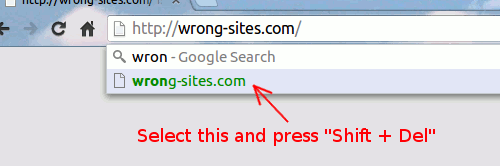
Type the query in the omnibar and wait for the suggestion to show up. Use the down arrow key to select the wrong URL and press “Shift + Del” (In Mac, use “Fn + Shift + Del”). This will immediately remove the item from the omnibar.
Note:
1. This trick only applies to URL. You won’t be able to remove search term with the “Shift + Del” key.
2. This trick applies to Firefox as well, except that you just need to press “Delete” instead of “Shift + Delete”.

![The Easiest Way to Automatically Open Websites in Incognito Mode [Chrome]](https://img.gamelinxhub.com/images/incognito-filter-chrome-featured.jpg?width=400&height=225&aspect_ratio=16:9)